

{Shikoku Hachijūhachikasho Meguri}
--WALKING--
--TELEPHONE & INTERNET CONNECTIVITY--
--WALKING--
--TELEPHONE & INTERNET CONNECTIVITY--
Internet Connectivity
In Autumn 2017, about two-thirds of the minshuku and ryokan that i stayed in offered free wifi to guests. There is now usually a slip of paper on the table in each room telling you the SSID and the password. On those occasions where there was nothing, when i asked about it i was given the information verbally. So while you won't always get wifi at these establishments, it seems that more ofthen than not you will. Yahoooo!
Hotels almost always have both public computers and free wifi in the lobby, and wifi in each guest room. Certainly not all hotels, but most of them do, and it seems to me that the number of hotels offering wifi is increasing. In the more rural areas, count on just the free shared computer in the lobby. In the mid-size to larger cities count on free wifi in the lobby and in your room.
There are more and more internet cafes to be seen along the trail in the less rural areas, particularly the provincial capitals (Tokushima, Kōchi, Matsuyama, & Takamatsu), but you'll have to look for them as they aren't obvious.
Anthony Kimple (Known Henro) many years ago told me that some book stores and gaming arcades have internet access for ¥400 to ¥700 per hour.
For wifi out on the road, the good news is that convenience stores on Shikoku are offering free wifi to everyone. Here's what i know:
»»
 To get connected at convenience stores you could register at each store's website and log in through those pages, but to simplyfy the process i installed a wonderful free app called Japan Connected Free Wifi on my iPod, although an android version is also available. It uses the icon shown on the right. Once the app is installed, you do need to register your email address but after that, at most convenience stores you pass open the app and it will tell you if there is free wifi available. If so, tap on the connect button to get connected, then open your browser or email app. There is no need to enter any log in information each time you use it. I use it at all 7-11 and Family Mart stores.
Public Telephones
While not all phones allow international calls, you can find public pay phones in restaurants, coffee shops, gas stations, bus & train stations, post offices, and some phone booths along the road. Of course all hotels & business hotels will have a pay phone in the lobby that you can use. One henro has even pointed out on the Online Henro Forum that there is almost always a pay phone near the mouth of tunnels of any length. (They are there for safety in case of an accident in the tunnel.)
One thing i have done on numerous occasions is to ask minshuku owners if i could use their phone in the morning before checking out to call another minshuku to make that night's reservation. I've never been told no. Many minshuku, ryokan, and hotels will also have a fax machine so you might be able to send and receive faxes (for a fee) from these places as well, if you are trying to talk to family back home.
Telephone Cards vs Coins
Telephones accept both coins and pre-paid phone cards. If you opt for coins, there is a good chance that you are going to find yourself getting cut off quite often unless you carry a lot of change and can feed the phone as fast as it uses them. This is avoided by carrying the phone card. These can be purchased in some vending machines and at kiosks at train stations, but the most convenient place to buy them is at one of the several million convenience stores located around the island. Telephone cards are pre-paid cards and come with fixed amounts on them, with the vast majority of the one's you'll find along the route being sold for ¥1,000. They are the size of a credit card, as thin as a business card, bendable, and plastic.
When you insert a phone card in the slot of a telephone, the phone will display how much money is left on the card. You can also get a good idea of how much is left by looking at the back of the card. A time scale is printed along the bottom of the back side of the card and just before it is ejected after each phone call, the telephone will punch a small hole along the line of numbers to indicate approximately how much money is left. If your card runs out of money before you complete your call, it will be ejected and you have only a few seconds to insert a new one before your call is disconneted. When the the card is ejected at the end of your call, the phone will beep to remind you to take it with you. The cards are not reusable so when one is used up, just throw it away.
A word of advice: If you are going to use public phones, buy a telephone card even before you set out from Tokushima. Forget about trying to use coins; the cards are just too convenient and easy to find.
Types of Telephones
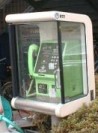 Telephones in Japan are color coded so that it is easy to figure out which one to use, even from a distance. There are about four different colors of phone, depending on their use, but the two that you will most commonly use are green and gray. Green phones are found everywhere — you'll find them in convenience stores, grocery stores, department stores, restaurants, bus and train stations, on the street in front of all of these, and in phone booths along the side of the road. Gray phones are harder to find in rural areas, but they are there.
All green phones accept coins, but not all of them accept a phone card (although most do). When using coins, you use either ¥10 or ¥100 coins. A ¥10 coin will last about one minute (depending on how far your are calling) and just seconds before it runs out you will hear a beep. If you get another coin in the slot within seconds, you stay connected; if you don't you get cut off. You can feed up to six ¥10 coins into the phone at one time. If you pre-feed several ¥10 coins at the start of your call, but don't use them all, they will be returned at the end of your call. A ¥100 coin will last about 10 minutes (again, depending on how far you are calling), but if you don't use it all during your call, change will not be returned.
Green phones are mainly used for calls to other desinations inside Japan and not all of them can be used to make international calls — in fact, most can not be. If they can be, this will be indicated on a gold plaque somewhere on the face of the phone.
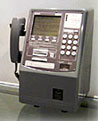 Gray phones, like the green variety, can be used to make local calls, but all gray phones can also be used to make international calls. They accept either coins or telephone cards.
While they are hard to find (if not impossible) in the very rural areas, they are found in most cities and towns of any size, and in some phone booths along the highways in between. In the cities, look near the train & bus stations, near the post office, and near the city or town hall. Or, just keep walking; sooner or later you'll come across one.
Mobile Phones
I use an iPhone with T-Mobile as my service provider. With my T-Mobile plan, i get free unlimited texting and data while in Japan, and almost anywhere else in the world. Plus, phone calls are only 25 cents/minute. This means that i am never unconnected while on the henro trail. But i still frequently use public phones to make lodging reservations.
Mobile Phone Rental: It's not cheap, but...